Accounting firms evaluating practice management software are usually trying to answer the same handful of questions: what does it cost, what does it actually do, how painful is switching, and what happens when something breaks. Here's where TPS Cloud Axis stands on each, as of today.
What TPS Cloud Axis is. TPS Software has built practice management software exclusively for accounting firms since 1999 — not software adapted from a CRM or generic project-management tool. TPS Cloud Axis is the cloud successor to TPS's original desktop product, which is being phased out; the cloud platform carries forward the same operational logic while adding client portal access, e-signature, and integrations the desktop version didn't have. Today it's used by 15,000+ accountants across 10+ countries.
Core capabilities. Everything in TPS Cloud Axis centers on a single client record — address and admin info, categories, comments, emails, documents, billing, time, workflow, and history all live in one place rather than scattered across separate tools. On top of that:
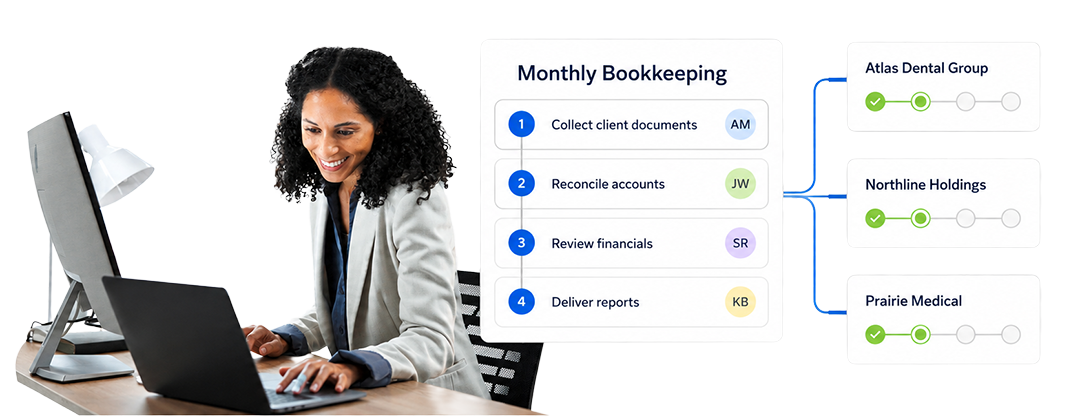
- Workflow — standardized recurring workflows, deadline visibility (upcoming/due/overdue at a glance), automated reminders and task creation, and workload visibility during busy season.
- Time & billing — time tracking, batch invoicing, accounts-receivable visibility, real-time reporting, and chargeable-vs-non-chargeable tracking.
- Documents & communication — documents and emails tied directly to the client record and the workflow itself, rather than living in separate inboxes or folders.
- Client portal & e-signature (Ultimate tier) — clients can upload documents, message the firm securely, and review invoices through a dedicated portal; e-signature is built in for engagement letters, with an audit-ready signature trail.
- Billing & payments — invoices can include integrated Stripe payment links; payments sync automatically to accounts receivable.
- Integrations — QuickBooks Online, Outlook 365, Gmail, Stripe, PayPal, Power BI, and DocuSign, with more added regularly.
Pricing.
TPS Cloud Axis runs three tiers, billed per user per month:
Entrepreneur — $18/user/mo. Full time & billing, time/WIP/AR/history, markup/markdown, billing options, client inquiry access, detailed reports, payments & adjustments, batch invoicing, multi-channel support, guides & tutorials.
Pro — $25/user/mo. Everything in Entrepreneur, plus full practice/workflow management, firm & employee calendars, client workflow management, mass mail & communication log, workflow alerts & reporting, bi-directional email, employee task management.
Ultimate — $34/user/mo. Everything in Pro, plus multi-office & consolidation, bi-directional Outlook email, outbound Gmail, QuickBooks Online bi-directional sync, secure client portal with unlimited storage, ePay/CPA Charge payment processing, Power BI firm insights, AI MCP integrations, built-in e-signature, and KBA (knowledge-based authentication).
No onboarding fee is charged; data conversion is billed separately if required. Integrations require a valid license for each connected product. QuickBooks Online implementation is a flat $350 (covering the first two hours), with additional time billed at $150/hour.
Enterprise-grade capability
Enterprise-grade capability, not enterprise-grade pricing. The Ultimate tier isn't just "more features" — several of its capabilities are specifically the kind that show up in enterprise-tier accounting software: multi-office and consolidation for firms operating across locations, Knowledge-Based Authentication (KBA) for identity verification, Power BI-powered firm insights and dashboards, AI MCP integrations, and a secure client portal with unlimited storage. TPS also already operates at real scale — 15,000+ accountants across 10+ countries, with 1.2M+ emails and workflow events processed and 4.5M+ invoices and payments handled through the platform. That combination — multi-office/compliance-grade features plus proven scale — is usually where software gets priced at a premium. TPS prices it at $34/user/month.
How it compares. Firms often assemble a portal tool, an e-signature tool, a payment processor, and a communication tool separately — and end up paying more across those vendors than a single TPS Ultimate seat costs. The starker comparison, confirmed directly against Canopy's live pricing page: Canopy's tiers run Standard at $74/user/month, Plus at $109/user/month, and Premium at $149/user/month (all billed annually) — Standard is genuinely their lowest published tier, nothing sits below it. TPS's most premium plan, Ultimate at $34/user/month, is still less than half the price of Canopy's cheapest plan. Put plainly: TPS's top tier costs less than half of what a comparable competitor charges for its entry-level plan.
Migration. Switching platforms is usually the biggest hesitation, and TPS's team has migrated hundreds of legacy systems, including older DOS-based platforms — no database is considered too old. Conversion happens in two levels: first the foundation (clients, employees, work codes), then active historical balances (detailed WIP and A/R). Typical turnaround is 3–4 business days, and firms get an automated email with a calendar link to schedule their data-collection date after signing up.
Support. Every plan includes unlimited support at no additional cost — email and direct phone, without a chatbot or ticket queue in between — plus a library of 300+ built-in training videos for self-paced learning.
Bottom line. TPS Cloud Axis is built specifically for accounting firm operations rather than adapted from general-purpose software. It backs that with enterprise-grade capability — multi-office consolidation, KBA authentication, Power BI dashboards, AI integrations — at pricing that undercuts comparable all-in-one platforms even at its top tier, plus a migration process designed to handle even very old legacy data. If you're evaluating it against alternatives, book a free demo to see it against your firm's actual workflow rather than a generic walkthrough.